v2.0 Released

Master your
Windows OS.

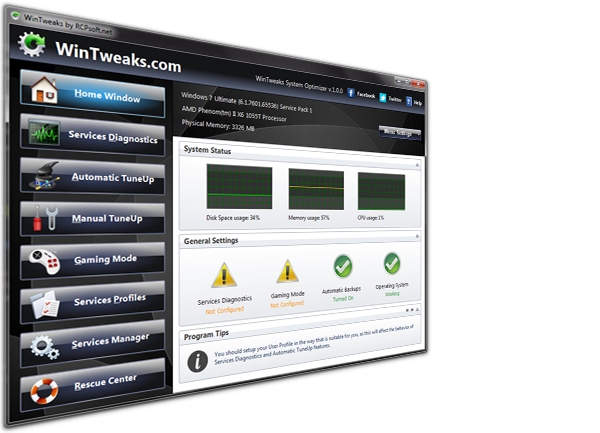
WinTweaks is a powerful and comprehensive Windows optimization tool designed to give you full control over your operating system. With an intuitive dark-themed interface and 80 carefully selected tweaks, WinTweaks helps you enhance performance, protect your privacy, customize the appearance, and clean unnecessary files.

100% Free & Secure

WinTweaks v2.0
WinTweaks Interface
80 Optimization Options

Key Features

A comprehensive suite of 80 tweaks covering all aspects of Windows optimization. Free, open, and safe.

Performance Boost

Optimize your system with 15 performance tweaks that reduce resource usage, disable unnecessary services, and make Windows faster.

Privacy Protection

Take control of your data with 15 privacy tweaks that disable telemetry, tracking, and data collection features built into Windows.

Visual Customization

Personalize your Windows experience with 15 visual tweaks, including dark mode enforcement, classic menus restoration, and taskbar customization.

System Configuration

Advanced system tweaks to disable unnecessary features, optimize power settings, and configure Windows exactly how you want it.

Deep System Cleaning

Clean up to 20 different areas of temporary files, cache, and unnecessary data to free up valuable disk space.

System Information

Complete hardware and software information dashboard showing detailed specs, Windows license key, and storage usage.

Full Feature Breakdown

Privacy Protection

  • Disable Windows Telemetry
  • Disable Cortana
  • Disable Activity History
  • Disable Location Tracking
  • Disable Advertising ID
  • Disable Windows Feedback
  • Disable Diagnostic Data
  • Disable Windows Timeline
  • Disable Error Reporting
  • Disable App Diagnostics
  • Disable Inking & Typing Personalization
  • Disable Camera Access (System-wide)
  • Disable Microphone Access (System-wide)
  • Disable Online Speech Recognition
  • Disable Web Search in Start Menu

Performance Boost

  • Disable Visual Animations
  • Disable Startup Delay
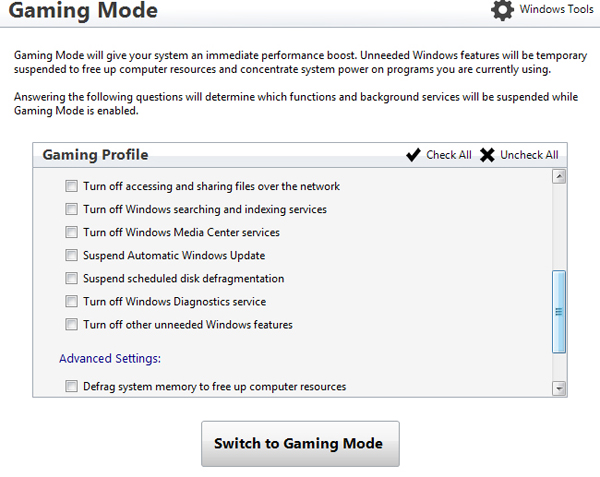
  • Enable Game Mode
  • Disable Background Apps
  • Disable Superfetch/SysMain
  • Disable Prefetch
  • Disable Windows Search Indexing
  • Disable Windows Tips
  • Disable Remote Assistance
  • Enable Fast Startup
  • Disable Print Spooler (if not printing)
  • Optimize Memory Compression
  • Disable Live Taskbar Previews
  • Disable Action Center Notifications
  • Disable System Sounds

Visual Customization

  • Force Dark Mode (System-wide)
  • Disable Transparency Effects
  • Restore Classic Context Menu (Windows 11)
  • Show File Extensions
  • Show Hidden Files and Folders
  • Disable Lock Screen
  • Disable Aero Shake
  • Enable Compact View in Explorer
  • Classic Volume Mixer (Windows 11)
  • Disable Snap Assist
  • Never Combine Taskbar Buttons
  • Hide Task View Button
  • Hide Search Bar/Box
  • Show This PC on Desktop
  • Remove Menu Show Delay

System Configuration

  • Disable Hibernation
  • Disable System Restore
  • Disable Automatic Windows Updates
  • Disable UAC (User Account Control)
  • Disable Windows Defender
  • Disable Windows Firewall
  • Disable Page File (if 16GB+ RAM)
  • Enable Ultimate Performance Power Plan
  • Disable Automatic Driver Updates
  • Disable Auto Reboot After Updates
  • Disable OneDrive Integration
  • Disable Reserved Storage
  • Reduce Menu Show Delay
  • Disable Network Throttling
  • Optimize for SSD

Deep System Cleaning

  • Windows Temp Files
  • User Temp Files
  • Prefetch Files
  • Windows Logs
  • Thumbnail Cache
  • Recycle Bin
  • Windows Update Cache
  • Delivery Optimization Files
  • Windows Error Reports
  • Memory Dump Files
  • DirectX Shader Cache
  • Windows Installer Cache
  • Event Viewer Logs
  • Recent Items History
  • Microsoft Store Cache
  • Edge Browser Cache
  • Chrome Browser Cache
  • Firefox Browser Cache
  • Font Cache
  • Icon Cache

System Information

  • Device Name
  • Processor Information
  • Installed RAM
  • System Type & Architecture
  • Device ID & Product ID
  • Windows Edition & Version
  • Installation Date
  • OS Build Number
  • Windows Feature Experience Pack
  • Windows License Key (with copy)
  • Storage Devices (with usage bars)

Why Choose WinTweaks?

Easy to use, safe, and reversible. WinTweaks is a Lightweight Windows application (no bloatware) that gives you full control. Fully compatible with Windows 10 and 11.

Windows 11
Windows 10
Safe & Reversible
Lightweight

Take full control of your Windows experience!

Download WinTweaks 2.0 today. Lightweight Windows application, and completely free.

WinTweaks v2.0.1

Build 2026.20 • Size: 2.8 MB

Free Freeware License

* If you don't have .NET 8.0 installed, the setup will ask you to download it automatically.

* We are working on adding multi-language support to the program soon.